
About Serena#
The IDE for Your Coding Agent
Serena provides essential semantic code retrieval, editing, refactoring and debugging tools that are akin to an IDE’s capabilities, operating at the symbol level and exploiting relational structure.
It integrates with any client/LLM via the model context protocol (MCP).
Serena’s agent-first tool design involves robust high-level abstractions, distinguishing it from approaches that rely on low-level concepts like line numbers or primitive search patterns.
Practically, this means that your agent operates faster, more efficiently and more reliably, especially in larger and more complex codebases.
Video Introduction#
Watch our video: Introduction to Serena in 5 Minutes (YouTube)
What Our “End Users” Say#
While it is humans who download and set up Serena, our end users are essentially AI agents. As the ones actually applying Serena’s tools, they are in the best position to evaluate Serena.
We crafted an unbiased evaluation prompt that leads the agent to perform ~20 routine coding tasks, representative of everyday development work, in order to estimate the value added by Serena’s tools when used alongside its own built-ins.
Here’s a one-sentence summary of what the agents had to say:
Opus 4.6 (high) in Claude Code on a large Python codebase:
“Serena’s IDE-backed semantic tools are the single most impactful addition to my toolkit – cross-file renames, moves, and reference lookups that would cost me 8–12 careful, error-prone steps collapse into one atomic call, and I would absolutely ask any developer I work with to set them up.”
GPT 5.4 (high) in Codex CLI on a Java codebase:
“As a coding AI agent, I would ask my owner to add Serena because it gives me the missing IDE-level understanding of symbols, references, and refactorings, turning fragile text surgery into calmer, faster, more confident code changes where semantics matter.”
GPT 5.4 (medium) in Copilot CLI on a large, multi-language monorepo:
“As a coding agent, I’d absolutely ask my owner to add Serena because it makes me noticeably sharper and calmer on real code – especially symbol-aware navigation, cross-file refactors, and monorepo dependency jumps – while I still lean on built-ins for tiny text edits and non-code work.”
Different agents in different settings independently converge on the same verdict.
Give your agent the tools it has been asking for and add Serena MCP to your client!
See our documentation for the full methodology and much more detailed evaluation results, or run your own evaluation on a project of your choice.
How Serena Works#
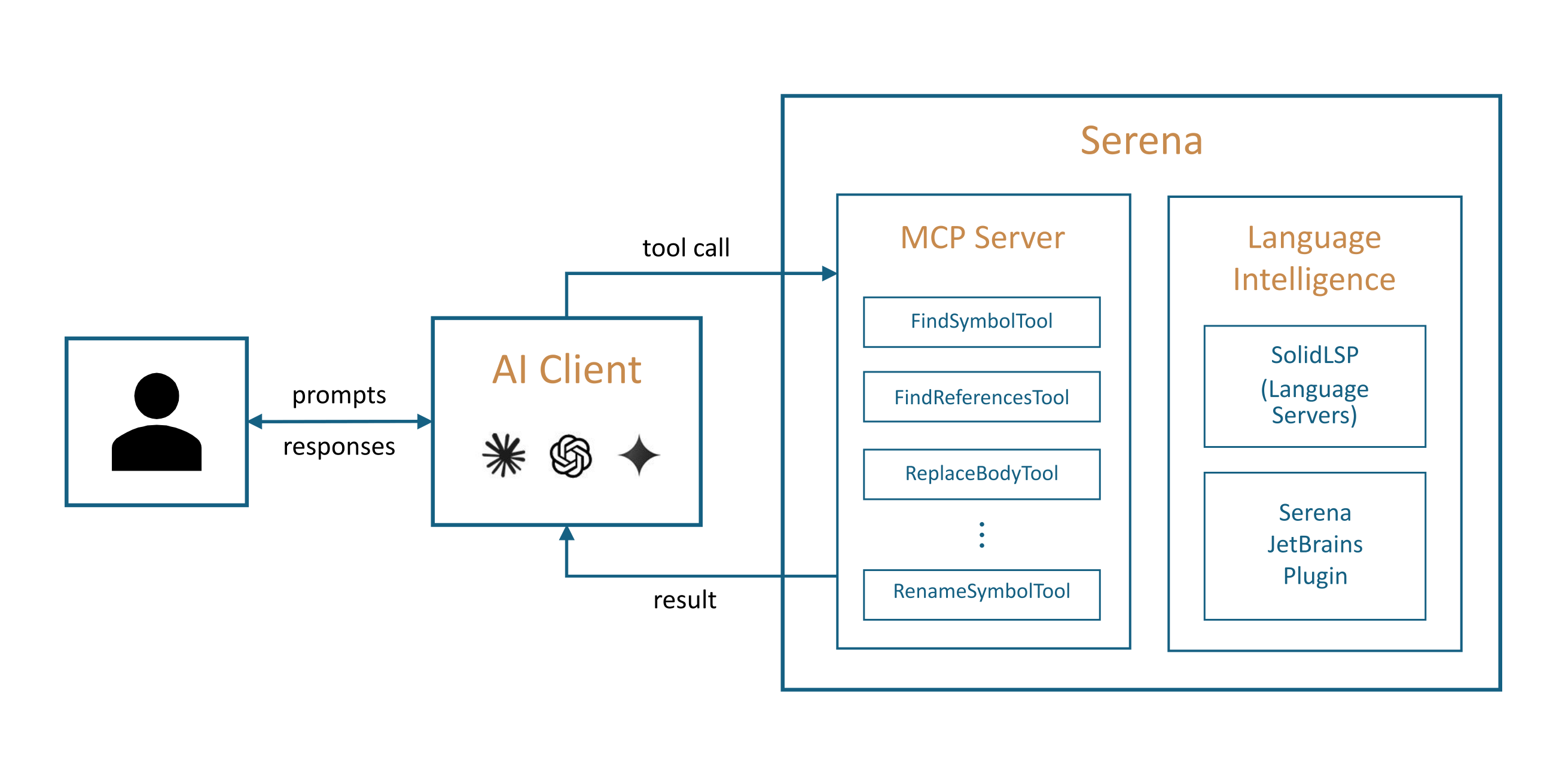
Serena provides the necessary tools for coding workflows, but an LLM is required to do the actual work, orchestrating tool use.
Serena can extend the functionality of your existing AI client via the model context protocol (MCP). Most modern AI chat clients directly support MCP, including
terminal-based clients like Claude Code, Codex, OpenCode, or Gemini-CLI,
IDEs and IDE assistant plugins for VSCode, Cursor and JetBrains IDEs (Copilot, Junie, JetBrains AI Assistant, etc.),
desktop and web clients like Claude Desktop, Codex App, or OpenWebUI.
See also: Introduction to Serena in 5 Minutes (YouTube)
To connect the Serena MCP server to your client, you either
provide the client with a launch command that allows it to start the MCP server, or
start the Serena MCP server yourself in HTTP mode and provide the client with the URL.
Want your language supported?
A new language server is the contribution Serena is built to receive — no issue required, and the path is mapped end to end in Adding Language Support.
The Shape of the System#
Serena has three layers. At the top, an MCP server that plugs into the coding agent you already use — see Clients for who connects and how. In the middle, the tools: symbol-level find, read and edit operations, listed in Tools and enabled per context, mode and project. Underneath, a language backend that supplies the semantic understanding — a language server for any supported language, or the JetBrains plugin riding your IDE’s own analysis.
How the Docs Are Laid Out#
About — what Serena is, the tools it carries, and the languages it speaks.
Usage — installing, connecting a client, configuration, the dashboard and the logs. Start at Installation.
Special Guides — per-stack walkthroughs: C/C++, Scala, Godot, Unreal Engine, ChatGPT and more.
Evaluation — Serena measured against real tasks, with the full transcripts.
Contributing — working on Serena itself, from a first change to a new language server, with a guided code reference.
Reading Them Well#
New here? Go straight down: this page, then Installation, then your client’s page — that is a working setup. After that the docs are built for dipping into, not reading through: come back when something surprises you, and take the guide or reference page that answers it.
If Your Reader Is an Agent#
These docs describe themselves. llms.txt at the site root lists every page with
a one-line summary, and each page’s markdown source is published beside it under
_sources/ — fetch _sources/<path>.md for the raw text. Both are generated from
the same sources as the pages, so they cannot drift.